
The operating decision
Wholesale purchases and sub-reseller permissions are different questions. The panel screenshots include a Resellers area, but actual permission, minimum allocation and commercial terms need confirmation for the distributor account.
Define who owns support, billing, credit allocation and customer renewals before inviting another reseller into the workflow.
Before buying credits, decide who will own customer setup, billing questions and renewal reminders. Start with a package that matches the customers you can support, then verify the actual panel permissions and account formats before expanding.
Current packages and duration mapping
Starter includes 10 credits at $13.90 per credit, total $139. Growth includes 25 at $13.40, total $335. Professional includes 50 at $12.90, total $645. Enterprise includes 100 at $11.90, total $1,190. All prices are in USD. The stated customer activation counts use 12-month accounts; shorter periods consume the fractional credits shown below.
| Customer duration | Credit use | Activations from 10 credits |
|---|---|---|
| 1 month | 0.1 credit | 100 |
| 3 months | 0.3 credit | 33 |
| 6 months | 0.6 credit | 16 |
| 12 months | 1 credit | 10 |
Counts assume the supplied duration mapping and one standard activation per customer.
A repeatable workflow
- Identify the account route. Confirm whether the customer needs M3U/server login, MAG portal registration or active-code access. Match the panel action to that route.
- Check term and connection allowance. Record the requested duration and verify any extra connection terms before using credits.
- Review the operation before submitting. Compare the account identifier, package and duration with the customer request. Avoid acting on a screenshot from another account.
- Record the confirmed result. Keep the private reference, panel result, credit use and new expiry together. An enquiry or pending payment is not a verified activation.
- Give the customer a setup test. Ask the customer to open a reference channel on the intended device and confirm picture, sound and guide navigation.
Before opening the panel
Before buying credits, decide who will own customer setup, billing questions and renewal reminders. Start with a package that matches the customers you can support, then verify the actual panel permissions and account formats before expanding.
A process is useful when another authorized operator can understand which action was completed and which step remains pending. Keep status wording specific. “Requested”, “awaiting payment”, “verified paid” and “activated” should not be interchangeable. This prevents a marketing form submission from being treated as proof of a completed sale.
Worked credit examples
Twenty-five one-month customers use 2.5 credits. Twenty-five three-month customers use 7.5 credits. Twenty-five six-month customers use 15 credits. Twenty-five annual customers use 25 credits. Use the duration mix to plan the balance; the number of customer records alone is not enough.
For a mixed group of ten monthly accounts, five quarterly accounts and three annual accounts, the mapped credit use is 1.0 + 1.5 + 3.0 = 5.5 credits. Subtract that from the available balance and leave a deliberate reserve for upcoming renewals. Calculate in tenths of a credit to avoid floating-point surprises in a spreadsheet or tool.
At the Starter unit cost, a monthly activation consumes $1.39 of credits and an annual activation $13.90. At Enterprise, the corresponding credit costs are $1.19 and $11.90. These are credit costs only. They exclude support time, payment charges, tax and any other operating cost.
Customer setup and support responsibilities
Give customers a supported installation route and the correct account method. A Samsung or LG television does not natively install the Android APK packages. A MAG Linux box follows a portal route, while Enigma2 setup depends on the receiver image. The app guide should reflect that difference before any credentials are issued.
Ask each customer to complete a short trial on the intended network. Check a live source, required category, audio, EPG and navigation. Record any model-specific limitation so the paid plan recommendation follows the actual test. Do not use catalogue artwork or a brand logo as a promise of current channel availability.
Records, security and permissions
Use a unique reseller-panel password and supported multi-factor authentication. Review authorized users after staffing changes and keep customer records restricted to the people who need them. Passwords, full playlists, device keys and recovery codes do not belong in public screenshots or a shared marketing document.
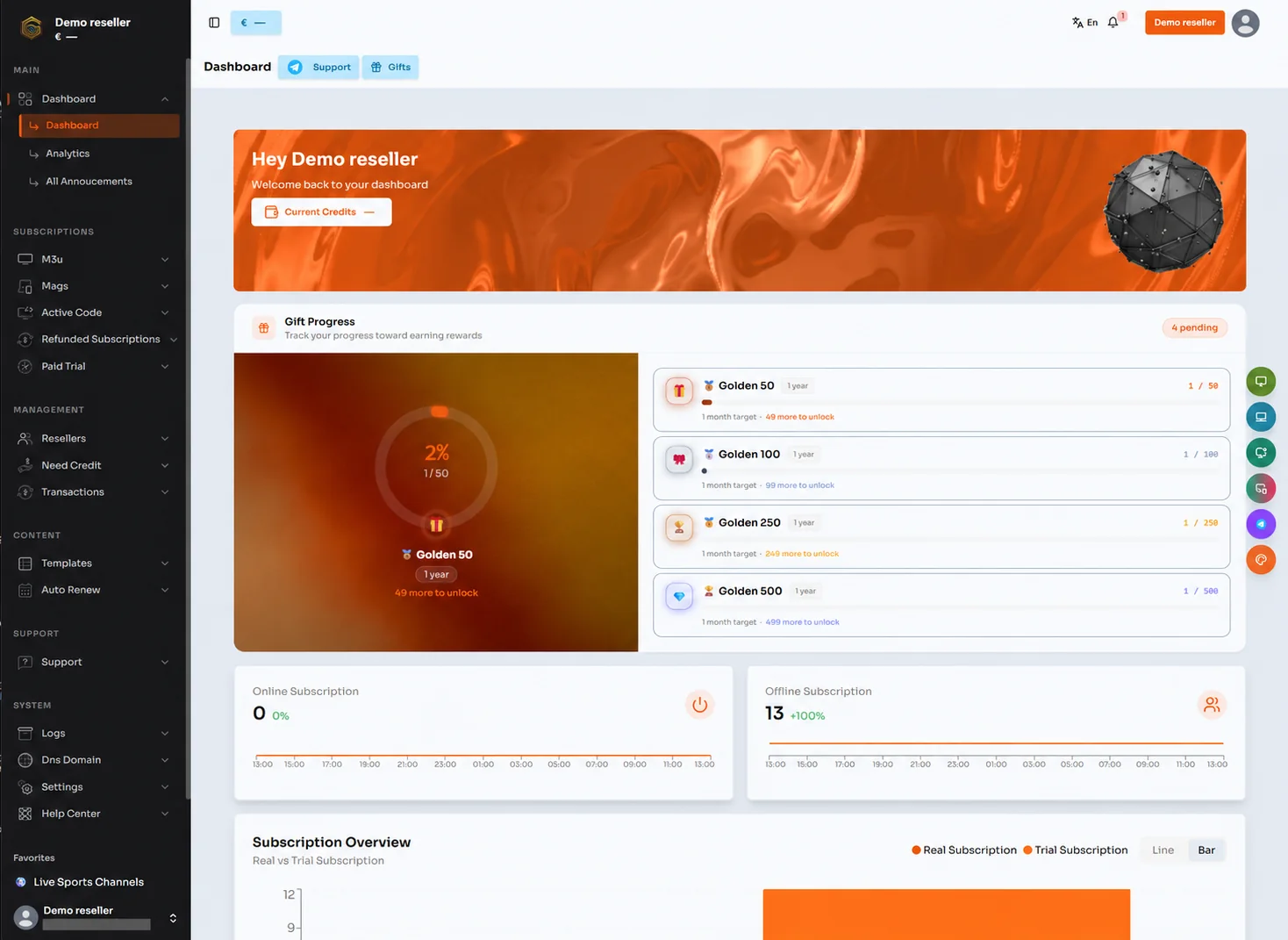
The panel image illustrates visible menu areas including subscriptions, M3U, MAGs, active codes, credit requests and transactions. Enabled functions and distributor privileges can vary. Confirm the actual account permissions with support rather than promising an option because it appears in an example screenshot.
Reconcile and review
Compare opening balance, purchased credits, allocations, activations, renewals and documented adjustments over the same period. If a difference remains, preserve the references and ask support to review the specific transactions. A balance comparison without dates or operation history is difficult to interpret.
Review repeat support issues and missed renewals before buying the next tier. A lower unit cost helps only when the operating process can support the additional customers. Scale the package size alongside verified demand and a clear support handoff.
Next step for wholesale and distribution
Review the wholesale section for credit purchasing and the distributor section for network responsibilities. Use the credit calculator to check capacity before requesting a package. Contact Golden OTT privately for panel permissions, payment details and onboarding.